Simple FTP server using python
For a while, I’ve wanted a simple FTP server, but I didn’t want to bother with installing a service, dealing with complicated configuration, or using something that isn’t portable. So, why not create my own lightweight FTP server in Python? Just the essential features, dead-simple configuration, running on Linux or Windows, either locally or on a remote host. It only needs administrator privileges to listen on port 21 (unless we configure it to use another port).
Know your enemy
If you need to learn or refresh your knowledge of FTP, Wikipedia provides a pretty good overview of how it works, but don’t expect a complete tutorial.
The probably best documentation on how FTP (should) work is RFC 959. It’s lengthy but comprehensive. However, it won’t give you a precise implementation, only guidelines.
You can also play in hardcore mode, ignore all of these, fire up Wireshark, and read the protocol’s raw commands.
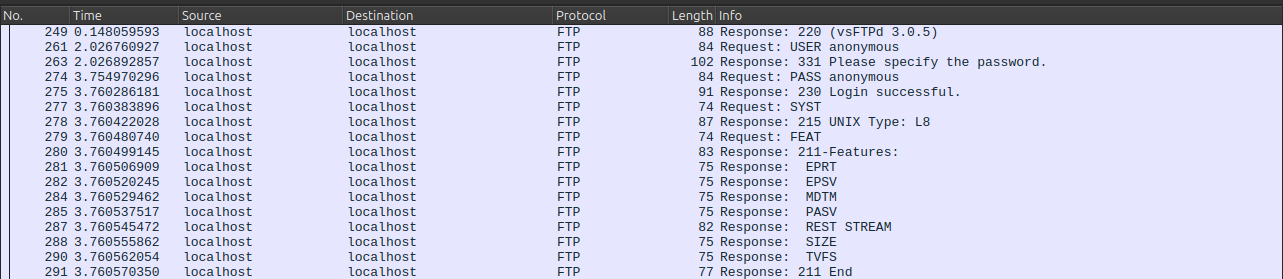
FTP is actually a fun and easy protocol to reverse-engineer. FTP commands are ASCII, and the server-client exchanges are pretty straightforward.
So I chose this approach: listen to a little client-server chit-chat and reproduce the server’s behavior.
Dirty magic
The resulting script can be divided into two major parts: a network handler that accepts a client connection and reads its input, and a function that analyzes this input and sends the appropriate response back to the client.
Here is the network handler :
1
2
3
4
5
6
7
8
9
10
11
12
13
14
15
16
17
18
19
#Create a socket and start listening
self.server = socket.socket(socket.AF_INET, socket.SOCK_STREAM)
self.server.bind(('0.0.0.0', port))
self.server.listen(1)

#Wait for a client to connect and send a welcome message
client, client_address = self.server.accept()
client.send("220 SimpleFTP 0.1\n".encode())

#Reading client input in loop
while True:
  data = client.recv(1024)

  if data:
    data = data.decode('utf-8').strip()

    #handle() will react to the client's input
    self.handle(client, data)
Here a part of the handle()function :
1
2
3
4
5
6
7
8
9
10
11
12
13
14
15
16
17
18
19
20
21
22
23
24
25
26
27
28
if " " in msg_received:
    cmd, arg = msg_received.split(' ', maxsplit=1)

if cmd == "USER":
    self.connecting_user = arg
    client.send("331 Please specify password.\n".encode())

elif cmd == "PASS":
    self.connecting_password = arg

    if self.user == self.connecting_user and self.password = self.connecting_password:
        client.send("230 Login successful.\n".encode())
    else:
        client.send("530 Login incorrect.\n".encode())

elif cmd == "SYST":
    client.send(f"215 {platform.system()}\n".encode())

elif cmd == "PWD":
    client.socket.send(f'257 "/{client.current_dir}" is the current directory\n'.encode())

elif cmd == "SIZE":
    filepath = arg

    if os.path.isfile(filepath):
        client.socket.send(f"212 {os.path.getsize(filepath)}\n".encode())
    else:
        client.socket.send(f"550 Failed to open file.\n".encode())
Of course we will need more commands to handle :
- LIST : list a directory contents
- STOR : upload a file
- RETR : download a file
- PWD : return current directory
- CWD : change current directory
And still a few more, depending on the features and clients we want to support. But more on that later. The next part will explore the EPSV and RETR commands.
In too deep
As seen earlier, implementing each required command is fairly easy using real-life examples. It gets a bit more complicated when it comes to uploading and downloading files, because these operations require opening a dedicated connection.
You have probably heard about “passive” and “active” modes in FTP. Let’s say a client wants to upload a file. It tells the server about it, and then:
- In passive mode, the server chooses a random port and tells the client, “Hey, connect back to me on this port so we can continue.”
- In active mode, the client chooses a port and tells the server, “Connect back to me on this port.”
Active mode is rarely used nowadays because clients are often behind a firewall, and in most cases, a client is not expected to open ports for incoming connections.
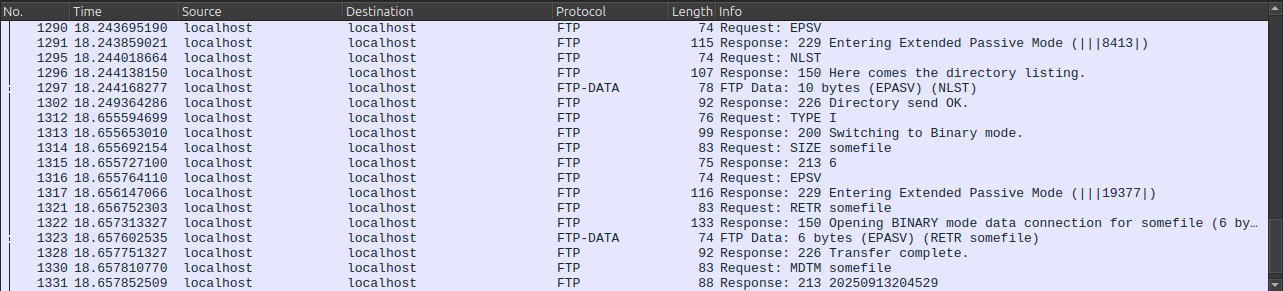
This code excerpt actually shows the Extended Passive mode (EPSV), but the classic Passive (PASV) mode works in a very similar way and is also included in the complete script.
1
2
3
4
5
6
7
8
9
10
11
12
13
14
15
16
17
18
19
20
21
22
23
24
25
26
27
28
29
30
31
32
33
34
35
36
37
38
39
40
41
42
43
44
45
46
47
#The client is asking to start EPSV mode
elif cmd == "EPSV":
    passive_port = random.randint(10000,65000)

    #Start the new connection in another thread
    t = threading.Thread(target=self.start_data_listener,args=[passive_port])
    t.start()
    client.send(f"229 Entering Extended Passive Mode (|||{passive_port}|)\n".encode())


#Start a new connection, waiting for the client to connect
def start_data_listener(self, port):

    server_data = socket.socket(socket.AF_INET, socket.SOCK_STREAM)
    server_data.bind(('0.0.0.0', port))
    server_data.listen(1)
    client.socket_data, client_address = server_data.accept()

    #Signals the socket is ready
    client.socket_data_ready.set()

    #Wait for the download to complete and set client_data to None
    while True:
        if not client.socket_data:
            break


#The client asks to download a file
elif cmd == "RETR":

    #make sure the client_data socket is ready
    client.socket_data_ready.wait()

    filepath = os.path.join(self.root_dir, arg)
    filename = os.path.basename(filepath)

    client.send(f"150 Opening {self.data_type} mode data connection for {filename} ({os.path.getsize(filepath)} bytes).\n".encode())

    with open(filepath, 'rb') as f:
        client.socket_data.send(f.read())

        #Close properly the socket
        client.socket_data.close()
        client.socket_data = None
        client.socket_data_ready.clear()

        client.send("226 Transfer complete.\n".encode())
Bullet Proof… I Wish I Was
Even if we are aiming for an FTP server that is as simple as possible, there are a few security features we should think about.
Invaders Must Die
Our server allows anonymous login as well as username/password authentication. Note that credentials must be supplied through arguments when the server starts and are not system-based. Any logged-in user can both read from and write to the FTP root directory. And don’t forget to actually check whether a user is logged in before handling any command they might send.
Another One Bites the Dust
Without any specific checks, a client could browse and download the server’s entire filesystem (remember, listening on port 21 requires administrator privileges). The FTP server needs to make sure a client can’t escape the FTP root directory.
Be aware that possible attacks include editing /etc/passwd to create a privileged user, as well as downloading or deleting all your files.
Rage Against the Implementation
Throwback to protocol analysis. I used readily available tools: tnftp (aka the ftp command on Unix-like systems) and vsftpd as a server to capture every useful command: changing and listing directories, uploading/downloading files, etc.
I managed to build a working PoC server in less than 24 hours. It was pretty easy, maybe a bit too easy, because then I wanted to test another FTP client, just in case… And that’s when I found out that gFTP and FileZilla didn’t work exactly the same way.
tnftp uses NLST and relative paths, but gFTP prefers LIST, full paths, and sends a CHMOD after uploading a file.
The FileZilla client is even weirder: after a short timeout (but not always?), FileZilla simply reconnects to the server and goes through the welcome message and authentication process again, without explicitly closing the previous connection. Pure madness.
Let’s take a look at wireshark on this :
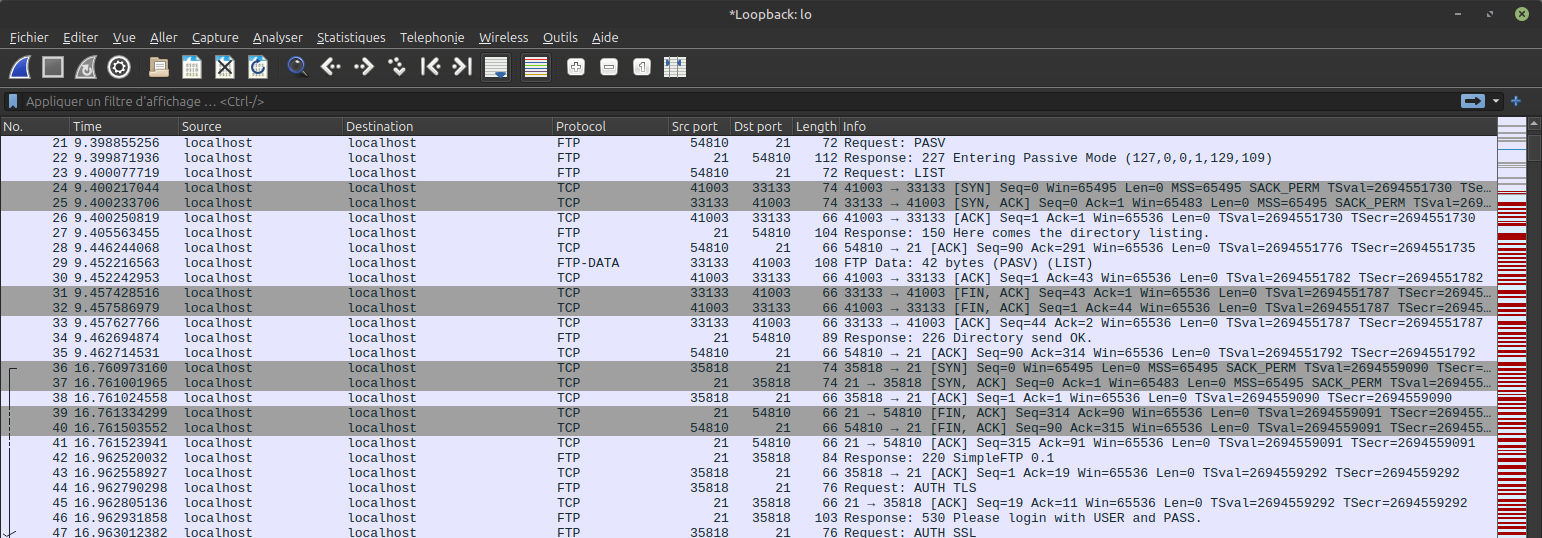
We are capturing the moment when the server is sending a directory listing, which concludes with packet no. 34, followed immediately by the client’s ACK from port 54810. I waited a few seconds (approximately 7, according to the time column) and then uploaded a file.
In packet no. 36, the client is now using port 35818 and initiating a new TCP handshake! In packets 39 and 40, the server is closing the previous connection, as the script manually shuts down the previous socket in such cases. Otherwise, this connection would remain unused and eventually be forgotten.
In packet 42, after the TCP handshake, the server sends the welcome message, prompts the client for authentication, and continues with the requested upload.
There may be some reason for this, but I still find it weird.
In the End
So, my initial goal was to create a minimalist FTP server for basic features. It was pretty easy to do using tnftp, but it got more complicated when I tried to support gFTP and FileZilla (let’s be safe and not try any other clients).
After getting the server to work with FileZilla, I decided to split the project into two scripts: a minimal one, with fewer features and tested only with tnftp; and another that aims to be a full-featured FTP server and support any (RFC-compliant) client.
I will keep trying to make minimal-server.py smaller and add features to full-server.py whenever I have time. Pull requests are welcome!
Repo is here
Come out and play
https://www.solarwinds.com/serv-u/tutorials