
Simple FTP server using python
For a while I wanted a simple FTP server, but didn’t want to bother with installing a service, overcomplicated configuration, non-portable thing.
So why not create my own lightweight FTP server in python ? Only the essential features, dead simple settings, running on Linux/Windows, locally or on a remote host. It will only needs admin rights to listen on port 21 (unless we set another listening port).
Know your enemy
If you need to learn or refresh your knowledge about FTP, Wikipedia gives a pretty good overview of how it works, but don’t expect a complete tutorial.
The probably best documentation on how FTP (should) work is RFC959. It is lenghty but comprehensive. This won’t give a precise implementation though, only guidelines.
You can also play in hardcore mode and ignore these, fire up wireshark, and read the protocol’s raw commands.
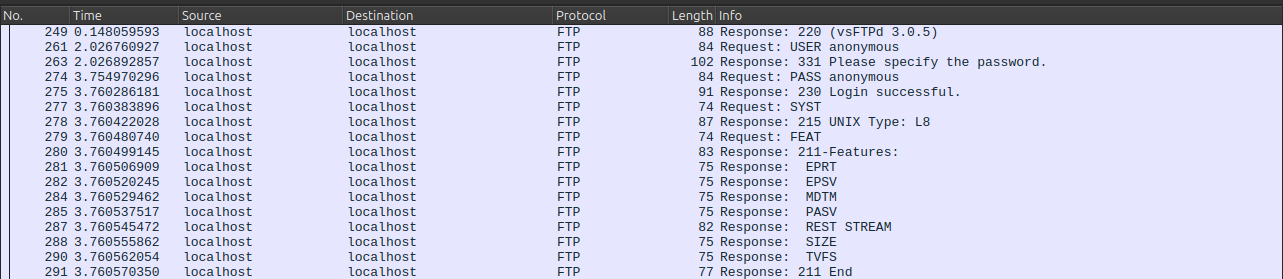
FTP is actually a fun and easy protocol to reverse engineer. FTP commands are ASCII and server-client exchanges are pretty straightforward.
So I just chose this path : listening to a little client-server chit chat and reproduce a server behaviour.
Dirty magic
The resulting script can be described with two major parts : a network handler that will accept a client and read for its input, and a function that will analyze this input and send to the client an appropriate answer.
Here is the network handler :
#Create a socket and start listening
self.server = socket.socket(socket.AF_INET, socket.SOCK_STREAM)
self.server.bind(('0.0.0.0', port))
self.server.listen(1)

#Wait for a client to connect and send a welcome message
client, client_address = self.server.accept()
client.send("220 SimpleFTP 0.1\n".encode())

#Reading client input in loop
while True:
  data = client.recv(1024)

  if data:
    data = data.decode('utf-8').strip()

    #handle() will react to the client's input
    self.handle(client, data)
Here a part of the handle()function :
if " " in msg_received:
    cmd, arg = msg_received.split(' ', maxsplit=1)

if cmd == "USER":
    self.connecting_user = arg
    client.send("331 Please specify password.\n".encode())

elif cmd == "PASS":
    self.connecting_password = arg

    if self.user == self.connecting_user and self.password = self.connecting_password:
        client.send("230 Login successful.\n".encode())
    else:
        client.send("530 Login incorrect.\n".encode())

elif cmd == "SYST":
    client.send(f"215 {platform.system()}\n".encode())

elif cmd == "PWD":
    client.socket.send(f'257 "/{client.current_dir}" is the current directory\n'.encode())

elif cmd == "SIZE":
    filepath = arg

    if os.path.isfile(filepath):
        client.socket.send(f"212 {os.path.getsize(filepath)}\n".encode())
    else:
        client.socket.send(f"550 Failed to open file.\n".encode())
Of course we will need more commands to handle :
- LIST : list a directory contents
- STOR : upload a file
- RETR : download a file
- PWD : return current directory
- CWD : change current directory
And still a few more, depending on the features and clients we want to support. But more on that later, next part will explore EPSV and RETR commands.
In too deep
As seen earlier, implementing each needed command is fairly easy using real life examples. It gets just a bit more complicated when it comes to upload and download files, because these will need to open a dedicated connection.
You probably heard elsewhere about “passive” and “active” modes in FTP ? Let’s say a client wants to upload a file. It tells it to the server, and then :
- In passive mode, the server decides of a random port and say to the client “hey, connect back to me on this port so we can continue”
- In active mode, the client chooses a port and say to the server : “connect back to me on this port”
But the active mode is rarely used because nowadays, clients are often behind a firewall and in most of the time, a client is not expected to open ports.
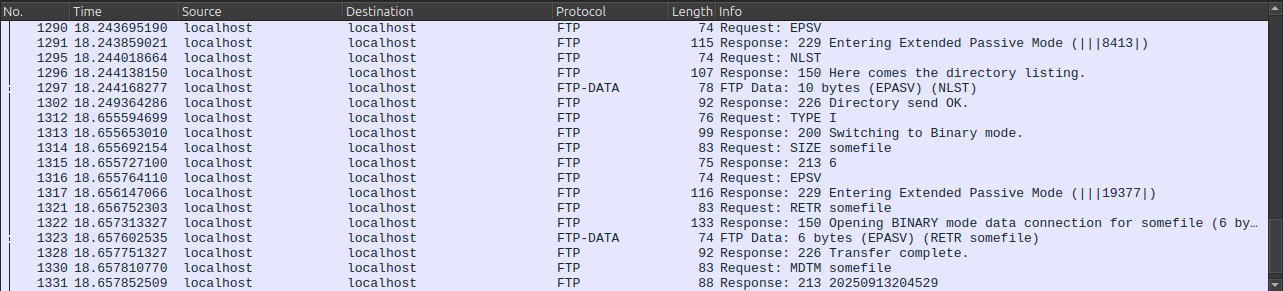
This code excerpt actually show the Extended Passive mode (EPSV), but the classic Passive (PASV) mode works a very similar way and is also in the complete script.
#The client is asking to start EPSV mode
elif cmd == "EPSV":
    passive_port = random.randint(10000,65000)

    #Start the new connection in another thread
    t = threading.Thread(target=self.start_data_listener,args=[passive_port])
    t.start()
    client.send(f"229 Entering Extended Passive Mode (|||{passive_port}|)\n".encode())


#Start a new connection, waiting for the client to connect
def start_data_listener(self, port):

    server_data = socket.socket(socket.AF_INET, socket.SOCK_STREAM)
    server_data.bind(('0.0.0.0', port))
    server_data.listen(1)
    client.socket_data, client_address = server_data.accept()

    #Signals the socket is ready
    client.socket_data_ready.set()

    #Wait for the download to complete and set client_data to None
    while True:
        if not client.socket_data:
            break


#The client asks to download a file
elif cmd == "RETR":

    #make sure the client_data socket is ready
    client.socket_data_ready.wait()

    filepath = os.path.join(self.root_dir, arg)
    filename = os.path.basename(filepath)

    client.send(f"150 Opening {self.data_type} mode data connection for {filename} ({os.path.getsize(filepath)} bytes).\n".encode())

    with open(filepath, 'rb') as f:
        client.socket_data.send(f.read())

        #Close properly the socket
        client.socket_data.close()
        client.socket_data = None
        client.socket_data_ready.clear()

        client.send("226 Transfer complete.\n".encode())
Bullet Proof… I Wish I Was
Even if we are aiming for as simple as possible FTP server, there is a few security features we should think about.
Invaders must die
Our server allows anonymous login and user/password authentication. Note that credentials must be supplied through arguments on server start and are not system-based. Any logged user can both read and write inside the FTP root directory. And don’t forget to actually check if a user is logged before handle any command it might send.
Another one bites the dust
Without any specific check, a client could browse and download the server’s whole filesystem (remember, listening on port 21 requires admin rights). The FTP server needs to make sure a client can’t evade the FTP root directory. Be aware possible attacks include editing /etc/passwd to create a privileged user and download/erase all your files.
Rage against the implementation
Throwback to protocol analysis. I used immediatly available tools : tnftp (aka ftp command on Unix-like systems) and vsftp as server to capture every useful command : change and list directory, upload/download, etc.
I managed to build a PoC-working server in less than 24 hours. It was pretty easy, maybe a bit too much, because then I wanted to test another FTP client, just in case… And found out gFtp or Filezilla where not exactly working the same way.
tnftp uses NLST and relative path, but gFtp prefers LIST, full path, and send a CHMOD after upload. Filezilla client is even weirder : after a short timeout (but not always ?), Filezilla just reconnect to the server and goes again through welcome message and auth, without explicitly closing the previous connection. Pure madness.
Let’s take a look at wireshark on this :
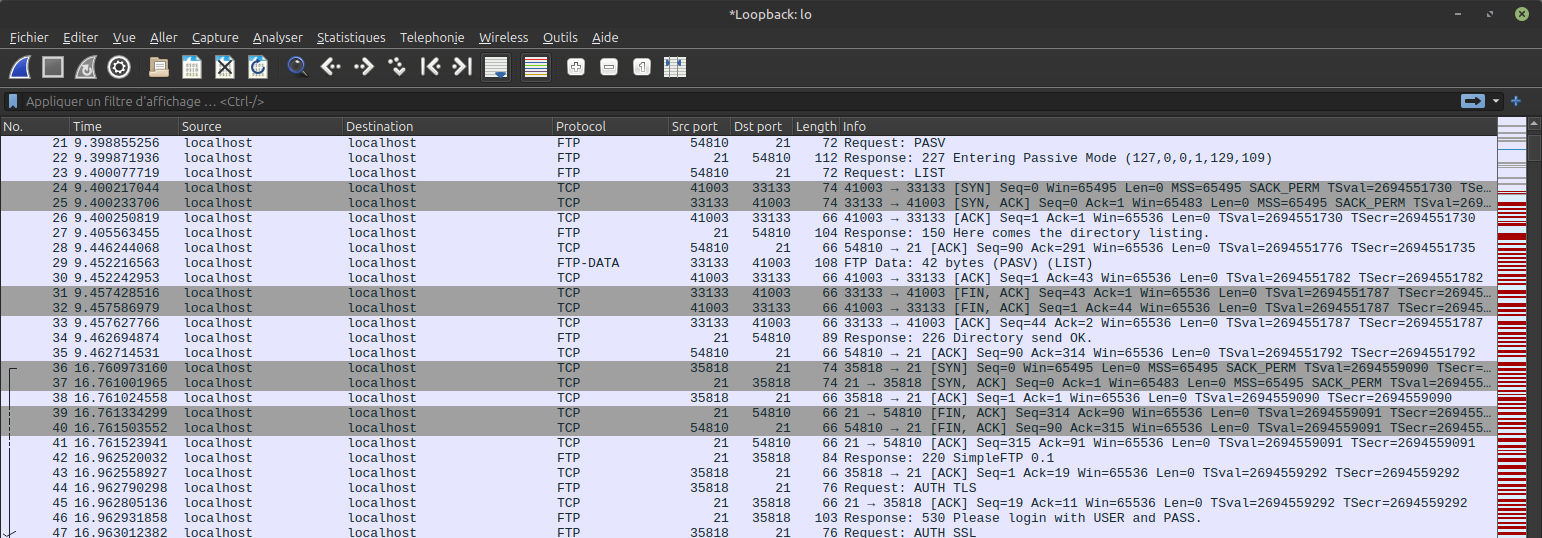
We are capturing right when the server is sending a directory listing that conclude on packet no. 34 and client’s ACK using port 54810 right after. I waited a few seconds (approximatively 7 according to the time column) and uploaded a file. On packet no. 36, client is now on port 35818, initiating a new TCP handshake ! On packets 39 and 40, server is closing the previous connection as the script manually shutdown down the previous socket on such cases. Otherwise this connection would be unused and forgotten. On packet 42, after the TCP handshake, server is sending the welcome message, prompting for client auth, and it keeps going towards the requested upload.
There may be some reason to this, but I still find it weird.
In the end
So my initial goal was to create a minimalist FTP server for basic features. It was pretty easy to do so using tnftp, but got more complicated to support gFtp and Filezilla (let’s be safe and not try other clients).
After getting the server to work with Filezilla, I decided to split the project in two scripts : a minimal one, with less features and only tested with tnftp. The other aim to be a full featured FTP server and support any (RFC compliant) client.
I will keep trying to make minimal-server.py smaller, and add features on full-server.py everywhen I got time. Pull requests welcome !
Repo is here
Come out and play
https://www.solarwinds.com/serv-u/tutorials